


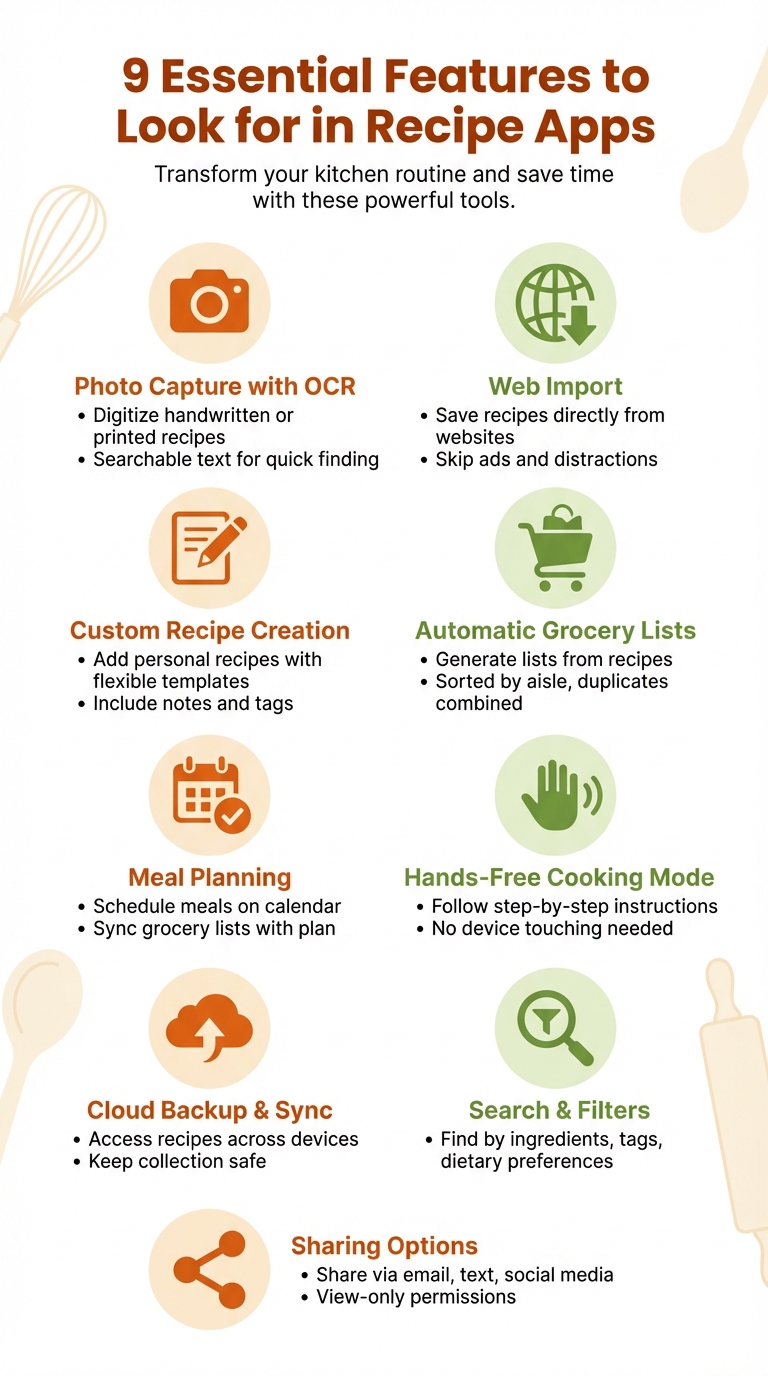
Managing recipes can be overwhelming – cookbooks, handwritten notes, and endless online bookmarks. Recipe apps bring everything together in one place, making meal planning, cooking, and grocery shopping easier. Here’s what to look for in a great recipe app:
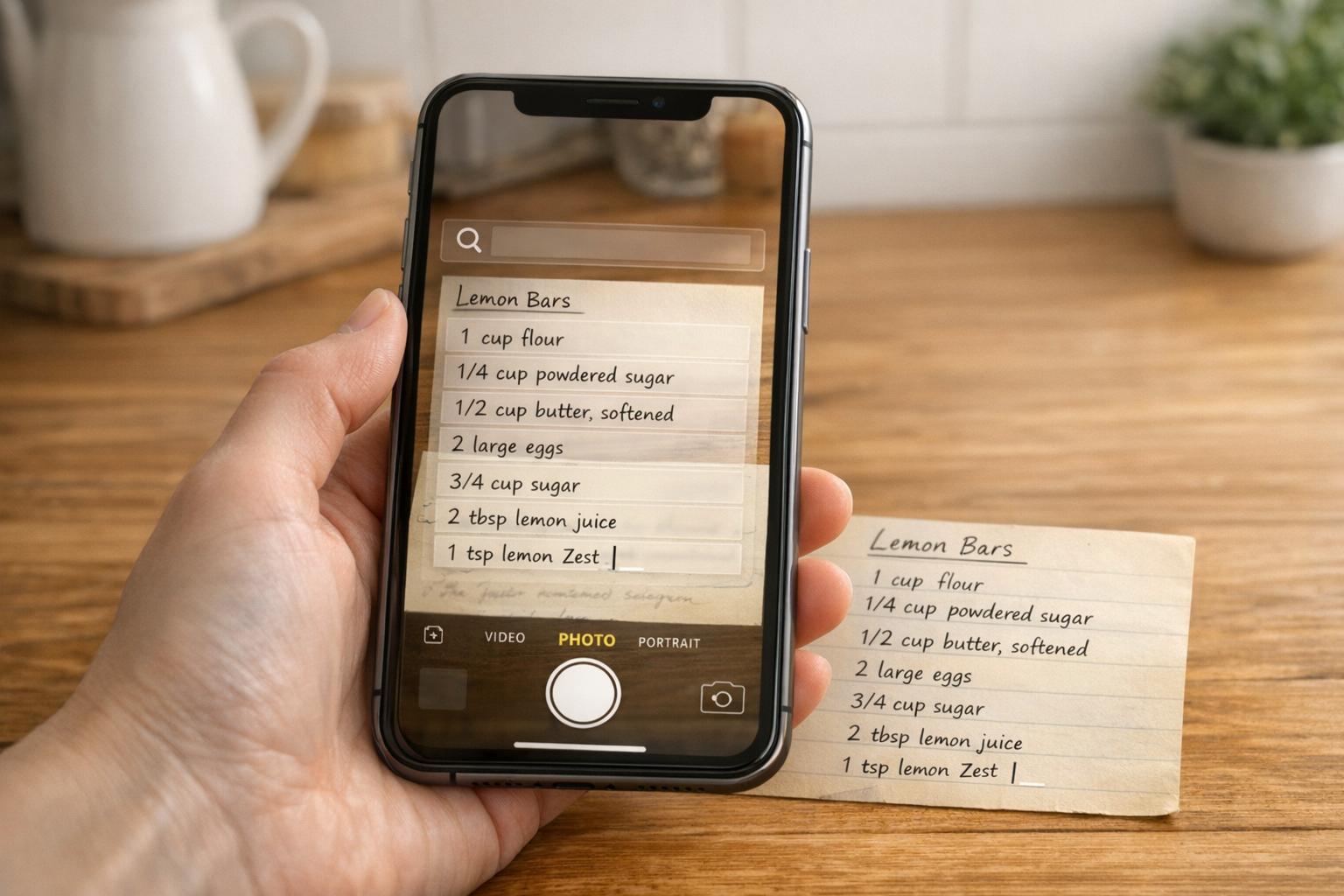
- Photo Capture with OCR: Digitize handwritten or printed recipes by snapping a photo. Searchable text makes finding recipes fast.
- Web Import: Save recipes directly from websites, skipping ads and distractions.
- Custom Recipe Creation: Add personal recipes with flexible templates, notes, and tags.
- Automatic Grocery Lists: Generate shopping lists from recipes, sorted by aisle, with duplicate ingredients combined.
- Meal Planning: Schedule meals on a calendar and sync grocery lists with your plan.
- Hands-Free Cooking Mode: Follow step-by-step instructions without touching your device.
- Cloud Backup & Sync: Access recipes across devices and keep your collection safe.
- Search & Filters: Find recipes by ingredients, tags, or dietary preferences.
- Sharing Options: Share recipes via email, text, or social media, with view-only permissions for others.
These features turn recipe apps into powerful tools that save time, reduce food waste, and simplify cooking. Look for an app that fits your needs and transforms your kitchen routine.
9 Essential Features to Look for in Recipe Apps
5 Best Apps Organize Recipe On Android | Digitize Your Kitchen (2026)
sbb-itb-6688478
Photo Capture for Quick Recipe Digitization
Picture this: you’re flipping through handwritten recipe cards or cooking with a cherished recipe nearby, only to risk spills or smudges. Photo capture offers a quick and easy solution. Instead of typing out every ingredient and instruction, you can simply snap a photo with your phone and save it digitally.
What makes this feature even better? It keeps the original charm of those treasured recipes intact. As OrganizEat explains:
Cook using photos of grandma’s handwritten recipes, preserving their original look and feel.
This way, you can enjoy the sentimental value of seeing the original handwriting while cooking, without worrying about damaging the physical copy.
The magic doesn’t stop there. With Optical Character Recognition (OCR), handwritten or printed text is transformed into searchable data. This means you can quickly locate a recipe by typing in an ingredient or dish name, even if it’s stored as an image. To get the best results, make sure to use bright, even lighting and place the recipe on a dark, flat surface when snapping your photo.
Once digitized, these recipe photos can be neatly organized with tags and folders, giving you instant access across all your devices. It’s a simple yet powerful way to manage your recipes and keep them safe. And there’s more – next, we’ll look at how web import makes adding online recipes a breeze.
Web Import for Adding Online Recipes
Manually copying recipes from blogs can be a tedious process. Web import simplifies this by pulling recipes directly from a URL or with just a tap. Many modern apps can automatically grab and organize key details like ingredients, instructions, cooking times, and even images – all in one go.
This feature also eliminates distractions like ads, pop-ups, and lengthy personal anecdotes, leaving you with just the essentials. With OrganizEat, for example, you can extract recipes from over 200 popular websites, including Delish, Food Network, and AllRecipes.
Once imported, keeping your recipes safe is crucial. These apps store recipes either locally or in the cloud, ensuring you’ll still have access if the original website disappears or moves behind a paywall.
Accessing your recipes across devices is just as easy. Browser extensions for Safari or Chrome let you save recipes without leaving your browser – just click the extension icon. On mobile, use the "Share" option in your browser to send recipes straight to the app.
After importing, it’s a good idea to review the recipe to ensure the ingredient list and formatting are accurate. If something doesn’t transfer correctly, you can always use the copy-paste tool to organize the text into ingredients and steps manually.
Custom Recipe Creation
Not every recipe you love is tucked away online. Whether you’re digitizing grandma’s handwritten cards, tweaking an old favorite, or inventing something totally new, OrganizEat makes it easy to create and manage recipes without rigid formatting rules.
You can manually type in recipes or paste text that the app automatically breaks into ingredients and steps. The Custom Entries feature offers a flexible template – no required fields – so you can jot down quick notes now and fill in the details later. It’s all about making your recipe collection work for you.
Want to take it up a notch? Attach multiple images, jot down personal notes, or even record voice memos and videos to save substitutions or cooking tips.
To keep things organized, you can assign custom tags like #gluten-free or #15-minute-meals and group recipes into folders based on seasons, family favorites, or cooking methods. Plus, a handy serving size slider automatically adjusts ingredient quantities – perfect for scaling recipes up or down.
For even better organization, stick to a consistent naming format, such as YYYYMMDD_RecipeName. Pair broad categories with specific tags to make multi-tag searches quick and efficient.
Automatic Grocery List Creation
Manually creating grocery lists can often lead to mistakes – missing ingredients, duplicates, or just plain inefficiency. That’s where OrganizEat steps in. The app simplifies the process by automatically generating a complete grocery list from your selected recipes. It gathers all the ingredients you need into one organized list, saving you time and ensuring you don’t leave anything behind.
When planning your meals for the week, OrganizEat goes a step further by combining your entire meal plan into a single list. Using its smart merging feature, the app spots duplicate items – like olive oil or garlic – and consolidates them into one entry with the correct total quantity. This means no more over-buying and a cleaner, more streamlined list.
"One of the most useful features of a recipe app is the ability to generate a shopping list directly from a recipe. This feature saves time and ensures you have all the necessary ingredients before you start cooking." – Digittrix
To make shopping even easier, OrganizEat categorizes your list by grocery store aisles – produce, dairy, pantry, and so on – helping you avoid unnecessary trips back and forth. You can also add non-recipe items, like cleaning supplies or toiletries, to keep all your shopping needs in one place. As you shop, you can check off items in the app, keeping track of what’s already in your cart.
Thanks to real-time cloud syncing, your list stays up-to-date across devices. Someone at home can plan meals on a tablet, while another person views the updated list on their phone at the store. You can also tweak the list – adjust quantities or remove items you already have in your pantry – giving you full control over your shopping experience.
Weekly Meal Planning Tools
Using a meal planner can make organizing your week or month a breeze. With a drag-and-drop calendar, tools like OrganizEat’s Premium Plan let you assign recipes to specific days, creating a clear and visual meal schedule that takes the guesswork out of daily meal decisions.
This scheduling feature isn’t just about convenience – it’s also deeply practical. The app integrates your meal plans directly with your grocery shopping. Once recipes are assigned, the app automatically compiles all the ingredients you’ll need into a single, well-organized shopping list, sorted by grocery aisle. This eliminates the hassle of manually creating lists and ensures you don’t forget key items.
Beyond saving time, meal planning can save you money and reduce waste. By sticking to app-generated shopping lists, families can cut grocery bills by 10% to 20%, as it helps curb impulse buys. Knowing exactly what you’ll cook and the ingredients required means fewer items end up languishing in your pantry or fridge, only to be thrown away later.
Another handy feature of OrganizEat’s meal planner is the ability to reuse successful weekly menus. If a week’s plan works well, you can save it and revisit it later, saving even more time in the future. Plus, with real-time cloud syncing, everyone in your household stays on the same page, making meal planning a collaborative and seamless process.
Hands-Free Cooking Mode
When you’re in the middle of cooking, the last thing you want is to juggle your phone with messy hands. A hands-free cooking mode solves this problem by letting you follow recipes step-by-step without ever needing to touch your device. The screen stays on throughout your cooking session, so there’s no need to keep unlocking your phone – making the process much smoother.
OrganizEat takes this concept further with its Cooking Mode, which breaks recipes into simple, easy-to-follow steps. Each step is displayed in large, clear text, making it effortless to read at a glance. Plus, you can mark steps as completed, helping you stay on track and avoid common mistakes like skipping ingredients or forgetting to preheat the oven.
Another standout feature is the built-in timers. Instead of switching to another app, you can set timers directly from the recipe with just one tap. For example, if a recipe says "bake for 25 minutes", you can start the timer right then and there. Voice guidance and a persistent display also let you navigate recipes without ever needing to touch your device, keeping your hands free for cooking.
OrganizEat’s hands-free features have earned high praise, including a 96/100 rating from The Lempert Report. It scored particularly well for usability (15/15) and usefulness (24/25). These ratings highlight how well-designed hands-free tools can turn cooking from a stressful, screen-tapping ordeal into a seamless and enjoyable experience. By keeping recipes accessible and easy to follow, hands-free mode ensures your time in the kitchen is as efficient as it is stress-free.
Cloud Backup and Multi-Device Sync
Imagine losing your entire recipe collection because of a device failure – it’s a nightmare no one wants to face. That’s where cloud backup steps in. By storing your recipes online, cloud storage ensures your digital cookbook stays safe and sound, no matter what happens to your device.
And it gets even better with multi-device syncing. Picture this: you’re browsing recipes on your laptop, checking ingredient lists on your phone at the grocery store, and following cooking instructions on your tablet – all without needing to manually transfer anything. Any updates you make – like tweaking an ingredient or jotting down a note – are instantly reflected across all your devices. It’s like having your recipes follow you everywhere, making cooking more convenient and stress-free.
OrganizEat takes this to the next level, offering built-in cloud backup and syncing as a key feature. This means your recipes are always protected and accessible. Got a new phone or tablet? No problem – your entire recipe library is ready to go as soon as you log in. Even if you’re cooking in a Wi-Fi–free zone, your recipes remain at your fingertips, securely stored and ready to use.
For added peace of mind, enable two-factor authentication (2FA) on your account. This extra layer of security is especially valuable if you’re safeguarding cherished family recipes or your own culinary creations. With cloud backup and syncing, your recipe collection becomes a dependable kitchen companion, always ready to inspire you, no matter where you are.
Recipe Sharing Options
Sharing recipes goes hand in hand with seamless syncing, making it easier to collaborate and plan meals with family or friends. A solid recipe app doesn’t just store your favorite dishes – it also simplifies the process of sharing them. Whether you’re passing along grandma’s famous lasagna to your sister or coordinating a holiday feast, recipe sharing options ensure your collection stays organized while giving others access to exactly what they need.
Many apps default to view-only permissions, allowing recipients to see your recipes without the risk of accidentally altering or deleting anything. As OrganizEat explains, "Once the email invitation is accepted, users have view-only access". This approach safeguards your carefully arranged folders and tags while still enabling others to browse your recipes.
Apps also provide direct sharing options, making it a breeze to send recipes via email, text, social media, or even as PDFs. Whether you’re sharing a single recipe with a quick tap or exporting a collection for a relative who prefers printed copies, these features help maintain your organizational system. For example, OrganizEat scored a perfect 10/10 for its sharing tools, which include email and social media integration. This contributed to its impressive overall rating of 96/100 from The Lempert Report.
For families managing meals together, collaborative features take sharing to another level. Shared collections allow multiple people to contribute recipes, making them ideal for planning big gatherings like Thanksgiving or a family reunion potluck. Some apps even offer cross-platform syncing with a single login, so everyone stays connected. Picture one person browsing recipes on a laptop while another checks the grocery list on their phone at the store – these tools make teamwork in the kitchen effortless.
To make sharing even more effective, consider tagging recipes with labels like #vegetarian or #kids-favorite, helping recipients filter through your collection. And don’t forget to double-check email addresses when sending invites to avoid spam filters.
Centralized Storage with Search and Filters
Once your recipes are organized, the next step is making them easy to find when you need them. Let’s face it – an app is only as good as its ability to help you locate the perfect recipe in moments. Centralized storage transforms your recipe collection from a chaotic archive into a practical tool for daily cooking, as highlighted by Recipe One.
With custom entries in place, advanced search and filtering features take your collection to the next level. Top-tier apps combine broad categories like "Main Dishes" or "Desserts" with detailed tags such as #gluten-free, #30-minute, or #kid-friendly. This setup allows you to zero in on exactly what you need. For example, you can instantly pull up vegetarian dishes that take less than 20 minutes to prepare. OrganizEat, which scored an impressive 96/100 from The Lempert Report for its centralized storage functionality, is a great example of how quickly you can locate recipes with the right tools.
Ingredient-based searches are another game-changer, letting you find recipes based on what’s already in your pantry. This not only saves you time but also cuts down on food waste. Dietary filters are equally helpful, automatically excluding recipes that don’t match your preferences – whether you’re looking for vegan, keto, nut-free, or low-carb options. Some apps even store recipes locally, ensuring you’ll always have access to your saved content, even if the original website or blog post disappears.
The recipe app market is booming, valued at roughly $724.4 million in late 2025 and expected to soar to nearly $6.5 billion by 2033. AI-powered search tools are also becoming more advanced, refining recipe recommendations based on your saved entries and ingredient preferences. As Recipe One aptly puts it:
Find any recipe in your collection in under ten seconds.
Conclusion
A well-designed recipe app can completely change how you approach cooking and meal planning by combining all the tools you need in one place. Features like photo capture, web imports, and the ability to create custom recipes offer a convenient digital space to store all your culinary ideas. Add to that automated grocery lists and meal planning calendars, and the app bridges the gap between finding a recipe and actually cooking it – making the nightly "what’s for dinner?" dilemma far less stressful.
On top of this, hands-free cooking features let you follow recipes without interruption, even when your hands are tied up, while cloud backup and multi-device sync ensure your recipes are always accessible – whether you’re at the grocery store or in your kitchen.
With centralized storage, advanced search filters, and recipe sharing, finding the perfect dish becomes effortless. Search by ingredient, dietary needs, or cooking time, and you’ll have what you need in seconds. These tools work together to simplify meal prep, making it a seamless part of your day-to-day life.
OrganizEat combines all these features into one app, earning an impressive 96/100 rating from The Lempert Report. By streamlining shopping, cooking, and even reducing food waste, it transforms meal prep into something enjoyable rather than a chore. When selecting an app, look for the features that align with your cooking habits and make your time in the kitchen more rewarding.
FAQs
How does OCR technology improve recipe apps?
OCR, or Optical Character Recognition, technology gives recipe apps the power to convert photos or scans of handwritten or printed recipes into searchable and editable text. This means those cherished, handwritten recipe cards can be digitized, making it effortless to organize and locate specific recipes whenever you need them.
By using OCR, you can preserve family traditions, skip the tedious task of typing everything out, and enjoy the simplicity of having all your recipes neatly stored and easy to access in one spot.
What are the advantages of using a recipe app for meal planning?
A recipe app takes the hassle out of meal planning by organizing all your favorite recipes – whether they’re handwritten notes, magazine clippings, or online finds – into one easy-to-search digital library. With cloud backup and syncing across devices, your recipes are always within reach, whether you’re using your phone, tablet, or computer. No more worrying about misplacing that cherished family recipe! Plus, you can tag recipes, add photos, and jot down notes, making it simple to sort through options like quick weeknight meals or special holiday treats.
Meal planning becomes a breeze with features that let you schedule dishes on a calendar, adjust ingredient amounts for any serving size, and automatically create a grocery list organized by store aisle. Some apps even include a hands-free cooking mode, so you can follow recipes step-by-step without having to touch your device – ideal for keeping things clean and stress-free in the kitchen. These tools not only save time and cut down on food waste but also make cooking at home a much more enjoyable experience, even for the busiest households.
How do recipe apps help reduce food waste?
Recipe apps are a great way to tackle food waste while keeping your kitchen organized. They help you track what’s in your pantry or fridge and even remind you when items are nearing their expiration date. Many of these apps allow you to log ingredients manually, scan barcodes, or input expiration dates, making it easier to use up what you have before it spoils. This not only helps you plan meals more efficiently but also ensures less food goes to waste.
Some apps take it a step further by creating shopping lists tailored to what you actually need, helping you avoid buying duplicates or overstocking. With features like cloud backup and device syncing, you can access your recipes and inventory from anywhere. Plus, hands-free cooking modes let you follow recipes effortlessly, so you never miss a step. Using these tools can save you money, cut down on waste, and even contribute to reducing food in landfills.