


Shopping without a plan wastes time, money, and food. A smart grocery list can solve these issues by keeping you organized and focused. Here’s how you can make your grocery trips faster and stress-free:
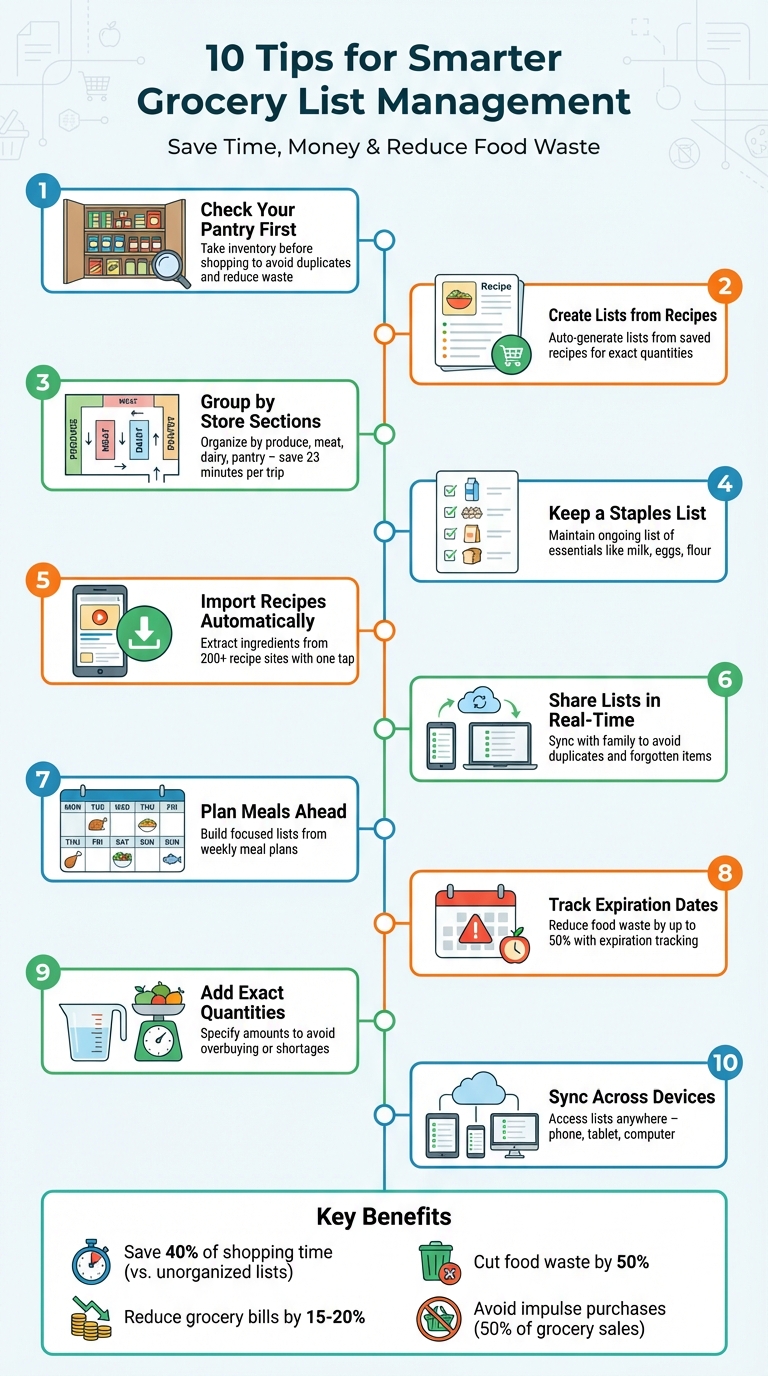
- Check your pantry first to avoid buying duplicates or missing essentials.
- Use recipes to auto-generate lists with exact quantities.
- Group items by store sections to save time in the aisles.
- Keep a running staples list for items you use regularly.
- Share lists in real-time with family members to avoid confusion.
- Plan meals in advance and align your list with what you’ll cook.
- Track expiration dates to reduce food waste.
- Specify quantities and units to avoid overbuying or shortages.
- Sync lists across devices for easy access anytime.
10 Smart Grocery List Management Tips to Save Time and Money
Never Forget Groceries Again! How to Create a Smart Grocery List on iPhone
sbb-itb-6688478
1. Check Your Pantry Inventory Before Making Your List
Heading to the store without checking your pantry first can lead to buying duplicates or forgetting key items you actually need.
Start by taking stock of your pantry, refrigerator, and any extra storage spaces like a basement or garage fridge. Toss out expired items, and if you find unexpired goods you won’t use, consider donating them instead.
To make this process easier, digital tools can be a game-changer. Apps like OrganizEat help you keep track of what you already have and even suggest recipes based on your current ingredients. Some apps even allow barcode scanning, making it quick and easy to log items. Plus, they can alert you when you’re running low on certain products, automatically adding them to your shopping list. These tools not only save time but set you up for smarter shopping overall.
"A well-organized pantry is a happy pantry. Knowing exactly what you have on hand not only saves you money by preventing duplicate purchases but also reduces food waste." – FlawlessCooking
To make inventory checks faster and more efficient, organize your pantry into zones. For example, dedicate specific areas for baking supplies, grains, canned goods, and snacks. When recording items, include as much detail as possible, like: "Organic Black Beans, 2 cans, 15 oz each, expires 8/15/2026, Pantry Shelf 2". Make it a habit to update your inventory immediately after shopping or finishing an item. This way, you’ll always know exactly what you have on hand.
2. Create Grocery Lists from Your Saved Recipes
Turning your saved recipes into grocery lists ensures you have exactly what you need for your planned meals. Instead of scribbling down random ingredients, you can pull them directly from your digital recipe collection.
With OrganizEat, this process is a breeze. Simply open a saved recipe, tap the shopping cart icon in the "Ingredients" section, and the items will be automatically added to your list. Planning for the week? Use the Meal Planner feature to export all your ingredients with just one tap. Keep in mind, this auto-add function only works with typed ingredients. If your recipe is saved as a photo without typed text, the shopping cart icon won’t appear – you’ll need to manually type or tag the ingredients. To streamline the process, make sure your recipes are digitized with typed ingredient lists.
Need to add household essentials like paper towels or cleaning supplies? Use the "+" button in the top-right corner to include them. Once you’re done shopping, you can clear your list by tapping the "more" button (three lines) in the top-right corner and selecting "Clear List" to prepare for your next trip.
For an even smarter approach, cross-reference your pantry inventory. Apps that sync recipes with pantry tracking can automatically remove items you already have, cutting down on duplicates and food waste. By combining your saved recipes with pantry tracking, you’ll take grocery management to the next level.
3. Group Items by Store Sections
Heading to the grocery store without a categorized list can turn your shopping trip into a chaotic adventure. You might find yourself wandering aimlessly, retracing your steps, or worse – forgetting something important. But when you group your list by store sections, everything changes. Suddenly, your shopping becomes a smooth, one-pass journey.
The idea is simple: organize your list to reflect the store’s layout. Most stores follow a predictable pattern – starting with produce, then moving to meat, dairy, pantry staples, frozen items, and household goods. By mirroring this structure, you avoid unnecessary backtracking and maintain a steady pace. Plus, this approach works seamlessly with digital tools, making your trip even faster.
"You’ll want to minimize the amount of time you spend wandering inefficiently from aisle to aisle. One of the best ways to do this is to group items into categories, ensuring you don’t have to revisit the same place twice at the store." – Sarah Moore, Author, Chowhound
A categorized list does more than save time – it reduces mental strain. Instead of juggling a scattered list in your head, you follow a clear roadmap. This also keeps impulse buys in check. Research shows that impulse purchases make up 50% of grocery sales, but using an organized list can shave an average of 23 minutes off your trip.
For those who prefer handwritten lists, try dividing your paper into quadrants, assigning each section to a store category. If you’re more into digital tools, apps like OrganizEat can automatically sort your list based on your store’s layout. With features like these, you can ensure every step you take in the store counts.
4. Keep a Running List of Basic Staples
Running out of milk while cooking or realizing you’re out of eggs during a hectic morning can throw off your plans. The fix? Keep an ongoing list of essential items and update it as soon as something runs low. This simple habit can save you from those last-minute grocery runs and ensure your kitchen is always stocked with the basics.
Think of this list as the backbone of your meal planning. These are the items you buy regularly – things like flour, eggs, and milk – that serve as the foundation for most meals. Having this list handy prevents those frustrating “I thought we had some left!” moments.
Make it a habit to add items to your list the moment you notice they’re running low. Digital tools like OrganizEat make this process seamless. You can track your inventory in real time, mark items as “out of stock,” and transfer them directly to your shopping list. This reduces the chances of forgetting something important.
Tailor your staples list to your household’s needs and focus on items that work across multiple meals. For example, spinach can be used in salads, omelets, and smoothies, giving you more flexibility with fewer ingredients.
Before adding items to your list, check your kitchen first. A quick scan of your pantry, fridge, and freezer can help you avoid buying duplicates. This small step can make a big difference – nearly 30% of purchased food ends up wasted. Plus, staying organized can lower your grocery bill by 15–20% and save you about 20 minutes per shopping trip. Keeping your staples list up to date not only reduces waste but also makes meal prep and shopping more efficient.
5. Import Recipes to Auto-Add Ingredients
Say goodbye to the hassle of manually typing out ingredients for your grocery list. With recipe importing, you can let technology do the heavy lifting. A single mistake while entering ingredients can throw off your shopping trip, but importing recipes directly from websites ensures accuracy and saves time.
OrganizEat makes this process seamless, supporting automatic recipe extraction from over 200 popular sites like Delish, FoodNetwork, and AllRecipes. Found a recipe you’re excited to try? Just tap the "Share" button in your mobile browser, select OrganizEat, and the app pulls in the ingredients and instructions automatically using the JSON-LD standard. No more tedious copying and pasting.
Once a recipe is saved, adding all its ingredients to your grocery list takes just one tap. If you’re planning meals for the week, the app combines ingredients from multiple recipes into a single, tidy shopping list. Need to adjust serving sizes? The Cooking Time Adjuster, introduced in January 2026, lets you tweak ingredient quantities with ease. For websites that don’t follow standard data formats, simply paste the recipe text into the app, and it will separate ingredients and steps for you (see our app tutorials).
Best of all, imported recipes sync across all your devices and remain available offline once cached locally. This feature ensures you’re always prepared, whether you’re meal planning at home or checking your list in the store.
6. Share Lists with Family Members in Real-Time
Shared lists in real-time make grocery shopping so much easier, especially when everyone in the household can contribute. They solve common issues like forgotten items or buying duplicates – problems that often crop up when family members rely on separate notes or random text messages.
The magic happens with instant synchronization. Picture this: your teenager adds their favorite snack to the list while you’re already in the produce aisle. It pops up on your phone immediately. Or, when you check off "milk", everyone at home knows it’s been purchased. This keeps the list updated and avoids unnecessary repeats or missed items. Pair this with digital pantry tracking, and you’ve got a system that ensures every item on the list is both needed and accounted for.
Encourage an "add-as-you-go" habit in your household. For example, if someone finishes the peanut butter, uses up the last of the laundry detergent, or notices the dog food is running low, they can add it to the list right away.
"Family List has been a game-changer for our household. No more duplicate purchases, no more forgotten items. My teenagers can add what they need, and whoever’s at the store can grab it." – Sarah M.
Using tools like OrganizEat takes this to the next level. It combines recipe management with grocery lists, so when you plan meals and generate a shopping list from saved recipes, everyone can see what’s needed for upcoming dinners. This level of transparency ensures no ingredient gets overlooked. Considering the average American family spends about 60 hours a year grocery shopping, switching to digital lists can save up to 40% of that time compared to unorganized paper lists. Up next: discover how meal planning can make your shopping lists even more efficient.
7. Plan Meals to Build Focused Shopping Lists
Meal planning turns grocery shopping into a more deliberate and efficient process. By deciding what meals you’ll prepare for the week ahead, your grocery list becomes a targeted tool rather than a random assortment of items. This way, every ingredient you buy has a purpose.
Start by choosing your recipes, then let those recipes shape your shopping list. With OrganizEat, this step is even easier. Simply tap the shopping cart icon next to a recipe’s ingredients to add them directly to your grocery list. The app also offers a "This Week" feature, which lets you create a shortlist of meals you want to try without locking yourself into a strict schedule. As OrganizEat explains: "The lightweight ‘This Week’ option is… perfect for anyone who wants to cook more at home but doesn’t need a rigid schedule. Just a shortlist of ‘things I want to cook soon’". This feature makes meal planning flexible and practical, aligning perfectly with a smart pantry management approach.
Pairing meal planning with a pantry check is a game-changer. Treat your pantry and freezer like your first stop before heading to the store. Look for recipes that use ingredients you already have, then plan meals around those items. For fresh ingredients, consider weekly store discounts – if chicken is on sale, for instance, pick recipes where it’s the star of the dish.
Once your meal plan is ready, you can use the "Add All to Grocery List" feature to create a detailed, sectioned list organized by categories like produce, dairy, and pantry staples. This level of organization not only saves time but also helps cut down on impulse purchases and extra trips to the store. You can even include non-recipe essentials, like snacks or household items, with the "+" button.
Focusing your shopping on whole foods – like fresh produce, meat, and dairy, typically found along the store’s perimeter – can help you eat healthier and save money by avoiding the pricier processed foods often found in the center aisles. This approach combines convenience with smarter spending.
8. Track Expiration Dates to Reduce Waste
Keeping an eye on expiration dates can help cut household food waste by as much as 50%. By knowing which items are close to expiring, you can prioritize using them in meals instead of letting them sit forgotten in your pantry or fridge. This strategy pairs well with meal planning, ensuring ingredients are used up before they go bad.
Set aside time each week – Sunday works well – for a quick 15-minute check of your pantry and fridge. Look for items that will expire within the next seven days, and plan your meals around them.
Understanding food labels is key. "Use by" dates are about safety, while "Best before" dates focus on quality. Many non-perishable items, like canned goods, dried pasta, and rice, can last up to two years if stored correctly, so there’s no need to toss them just because of a "best before" date.
To make tracking easier, try a color-coded sticker system:
- Red for items with 1–3 days left
- Yellow for 4–7 days
- Green for over a week
This visual system simplifies meal planning and grocery shopping by showing what needs attention first. Use the FIFO (First In, First Out) method – move older items to the front so they’re used before newer ones. Adding these habits to your routine can make managing your pantry more efficient and help you waste less food.
9. Add Exact Quantities and Measurements
Specifying exact quantities on your shopping list can make a big difference in how smoothly your trip to the store goes. When you skip over precise amounts, it’s easy to end up buying too much – or not enough – of what you need. As Janice Carte, Chef and Founder of Tiny Spoon Chef, explains:
"Always list quantities when categorizing, especially if you’re sending someone else. There can be a big difference between two and four oranges, depending on what you’re making."
This attention to detail is especially crucial for recipes that require precision. Sure, you can wing it a bit with salads, but baking? That’s a whole different story. A small misstep, like too much flour, can ruin a cake or make bread overly dense. For example, a cup of all-purpose flour can weigh anywhere from 120 to 150 grams depending on how it’s measured, so listing weight (like "8 oz flour") instead of volume ensures you’re more accurate.
Also, take a moment to check your recipes for repeated ingredients. If a dessert has a crust, filling, and topping, it might call for cream in all three parts. Adding up the total amount before heading to the store can save you from running out mid-recipe. The same goes for staples like butter or eggs, which often appear in multiple dishes.
Don’t forget to clarify your units. For instance, liquid ounces and dry weight ounces are not interchangeable. Also, note whether the measurement refers to whole or prepared items – "2 cups chopped onions" requires more than two whole onions. This kind of clarity eliminates confusion and makes shopping easier for anyone, whether it’s you or someone else. Tools like OrganizEat can even combine quantities from several recipes, making your list even more accurate.
10. Sync Lists Across All Your Devices
Forget the hassle of misplaced grocery lists – cloud syncing ensures your lists are available on every device, whether you’re planning meals at home or shopping in-store. Start a list on your laptop, and instantly access it on your smartphone when you’re out and about.
Changes made on one device update instantly across all others, so everyone stays on the same page. For example, if your partner adds "milk" from their phone while you’re already at the store, it’ll appear on your list immediately. As RecipeOne explains:
"Real-time syncing is a standard feature in any good grocery app. It allows multiple people to view and edit the same list at the same time, right from their own phones".
This feature works hand-in-hand with meal planning and pantry management, keeping everything streamlined and organized for the entire household.
Getting started with syncing is simple. Download the grocery app on all your devices, create an account on one device, and log in with the same account on the others. Many apps include a sync button for automatic uploads and downloads. Just make sure your Android devices are running version 5.0 or later.
Another perk? Cloud backup. If you lose your phone or upgrade to a new one, your lists and recipes stay safe online and can be restored in seconds. Apps like OrganizEat make this process effortless, ensuring your meal plans, recipes, and grocery lists are always at your fingertips.
For the best experience, choose an app that works on both iOS and Android and supports voice assistants. This way, you can add items hands-free while cooking or driving, and updates will sync instantly. Combine this with tools like automated recipe imports and shared lists, and you’ll have a grocery management system that’s efficient and stress-free.
Wrapping It All Up
Using these strategies can completely change how you approach grocery shopping. Simple steps – like reviewing your pantry, organizing your list by store layout, and keeping a running list – can save you time, money, and even reduce food waste. As Registered Dietitian Suzanne Fisher puts it:
"Having a meal plan in place reduces the stress and mental fatigue of deciding, ‘What’s for dinner?’"
Technology also plays a big role here. Digital tools now allow you to connect recipes directly to your shopping list, making it easier than ever to plan. You can import recipes, generate precise lists, and even share them instantly.
By pairing meal planning with recipe-based lists, you’re not just buying smarter – you’re cutting down on unnecessary purchases. Start by checking your weekly schedule to figure out how many meals you’ll cook at home. Then, focus your list on those specific recipes. This method not only curbs impulse buys but also helps stick to your budget.
An organized list doesn’t just save money; it also reduces decision fatigue and supports healthier eating habits. With features like cloud syncing, your grocery list is available on any device, whether you’re meal planning at home or shopping in-store.
Try starting with just one or two of these techniques and see the difference they make. Tools like OrganizEat combine recipe storage, meal planning, automated lists, and real-time syncing, making your kitchen routine smoother and more enjoyable. Small changes can lead to a big impact on both your wallet and your peace of mind.
FAQs
How do I set up a simple pantry inventory that stays updated?
To get started, take stock of everything in your pantry. Use a digital tool or app to log what you have, including quantities and expiration dates. For easier organization, group items into categories such as dry goods, snacks, and canned goods. Make it a habit to update your inventory regularly – weekly check-ins work well. During these check-ins, toss expired items, add any new groceries, and adjust quantities as needed. Using an app can make this process much smoother and help you stay on top of your pantry’s contents.
How can I build a weekly grocery list directly from my recipes in OrganizEat?
To build a weekly grocery list in OrganizEat, start by adding your recipes to the meal plan or the "This Week" list. Once that’s done, tap "More" in either the meal planner or recipe view, select "Add to groceries," and choose the weekly option. If you prefer, you can also manually add ingredients by tapping the shopping cart icon next to a recipe’s ingredients. The app will then create a categorized shopping list for easier shopping.
What’s the easiest way to share and sync one grocery list across my family’s phones?
The simplest method is to use a digital app that supports real-time collaboration. For instance, OrganizEat lets multiple users add, edit, and view grocery items at the same time, keeping everyone on the same page. Another option is the Reminders app on iPhone, which allows you to share a grocery list. Family members can get notifications whenever items are added or marked as bought.