


You probably have the same thought most first-time founders have when they start exploring diet planner app development: the idea feels obvious, but the path to building it does not.
You can already picture the product. Personalized meal plans. Grocery lists. Habit tracking. Maybe AI recommendations. Then the project expands. You need onboarding logic, nutrition data, health integrations, retention loops, privacy controls, and a decision on whether you're building for solo users, coaches, or families. That's where good ideas usually get bloated.
A diet app doesn't fail because the market is too small. It fails because the founder builds the wrong version first.
Table of Contents
- The Opportunity in Digital Diet Planning
- Defining Your User and Core Features
- Choosing Your Tech Stack and Integrations
- Designing a Seamless Meal Planning Experience
- Your Phased Development Roadmap
- Budgeting Monetization and Launch Strategy
The Opportunity in Digital Diet Planning
The category is larger than many founders assume, and it's changing fast. The global meal planning app market is estimated at USD 1.8 billion in 2025 and projected to reach USD 5.2 billion by 2034 at a 12.5% CAGR, while the AI-driven meal planning segment is projected to reach USD 11,566.5 million by 2034 at 28.10% CAGR, according to DataIntelo's meal planning app market report.
That shift matters because users no longer see meal planning as a static utility. They expect the app to help them decide what to eat, adapt to preferences, reduce shopping friction, and remember what happened last week. A calorie counter can still be useful, but it isn't enough of a product strategy by itself.
Why timing helps, but sequencing matters more
The opportunity isn't just market size. It's the product transition from manual logging to guided decision-making. That includes recommendation engines, automated grocery list generation, meal calendars, and apps that behave more like assistants than notebooks.
If you're researching what AI nutrition products already look like in the wild, AI tool Nutriscale Ai is one useful reference point for how founders are packaging personalized nutrition workflows into product form.
What founders usually get wrong is assuming the answer is “build more AI.” It usually isn't. The better question is whether the first version solves a narrow, repeated problem well enough that people come back without being pushed.
Practical rule: In diet planner app development, feature order matters more than feature count.
One of the fastest ways to sharpen your positioning is to look at where real users still complain. Community discussions around planning fatigue, recipe overload, and calendar usability often reveal more than polished landing pages do. That's why it's worth reviewing founder-relevant user pain in this roundup of meal planner app feedback from Reddit users.
What a founder should take from the market
A growing market doesn't guarantee a good product. It gives you room to build a focused one.
Three patterns are worth keeping in mind:
- Personalization is no longer optional. Users expect recommendations to reflect goals, preferences, and routines.
- Execution beats breadth. A small app that makes weekly planning easier can outperform a larger app with scattered features.
- Niche positioning is underrated. A product for families, allergy-aware households, or time-poor professionals can be stronger than a generic nutrition app.
Founders who do well in this category usually don't start by asking what they can add. They start by deciding what they can safely ignore for the first release.
Defining Your User and Core Features
A diet planner app gets easier to build once you stop trying to serve everyone.
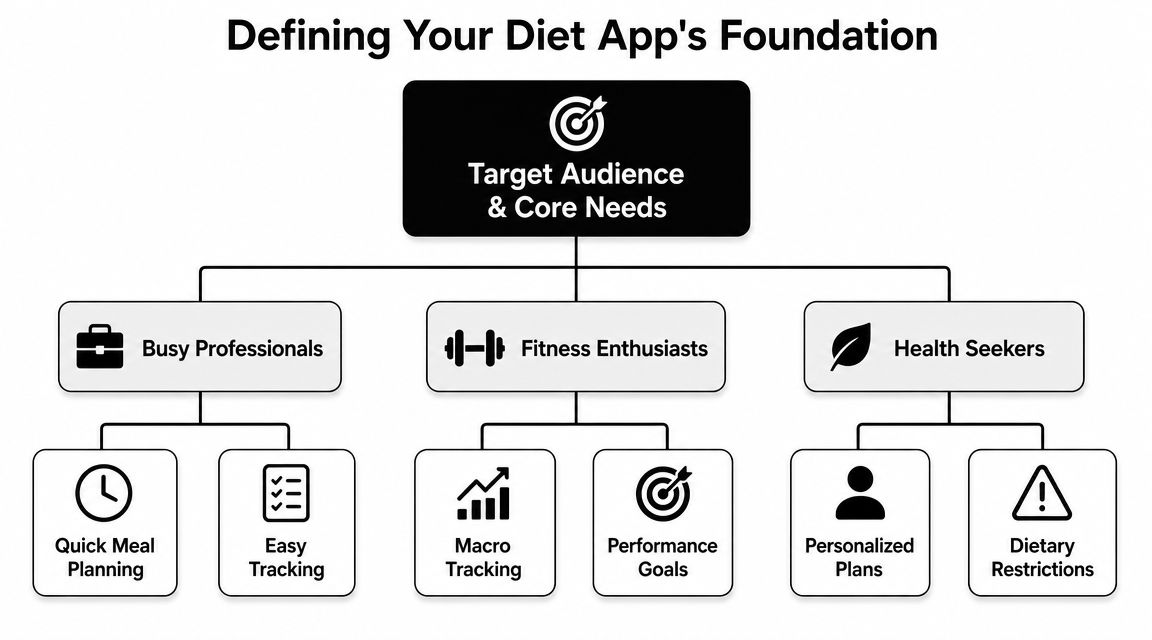
The biggest early product decision isn't whether to include AI, barcode scanning, or wearables. It's whether you're building for a solo user managing personal goals, or for someone coordinating food decisions for other people. Those are different products, with different onboarding, planning logic, and retention loops.
Choose one primary user, not three
Most diet apps chase the individual optimizer. Weight goals, calorie targets, macros, daily streaks. That path is familiar, which is why so many products cluster there. But a review of meal-planning apps found a notable gap in family-friendly recipes and household coordination, while a separate market review noted that 42% of leading meal-planning apps already use AI or ML for personalized recommendations and automated grocery list generation, creating a clear opening for products centered on shared planning instead of individual tracking, as discussed in the family meal-planning review.
That single choice changes everything.
If your core user is the solo dieter, the product usually revolves around:
- Goal-based onboarding
- Food logging
- Progress dashboards
- Personal recommendations
If your core user is the family manager, the product needs different mechanics:
- Multi-person preferences
- Shared meal calendars
- Household grocery workflows
- Conflict reduction, such as filtering meals by restrictions and tastes
Teams often overinvest in nutrition math and underinvest in coordination friction. For many households, the hardest part isn't counting calories. It's deciding what everyone can eat on Tuesday.
Separate MVP features from later-stage features
A useful MVP is small, but it can't feel thin. The right move is to ship the features that complete a weekly planning loop.
For most first releases, the must-have core looks like this:
- Profiles with practical inputs. Goals, dietary preferences, allergens, household size, or routine.
- Meal planning flow. Daily or weekly selection with a clear calendar view.
- Recipe or meal cards. Enough structure to support planning and repeat use.
- Shopping list generation. Manual or semi-automated is fine at MVP stage.
- Basic logging or check-off behavior. Not full nutrition analysis. Just enough to track adherence or completion.
- Cloud sync. People switch devices, and shared planning breaks without it.
Then there's the second bucket. These features are valuable, but they shouldn't slow your first launch:
- AI meal recommendations
- Barcode scanning
- OCR for recipe import
- Computer vision food logging
- Advanced nutrient breakdowns
- Coach chat or professional consultations
- Deep wearable integrations
A lot of founders need a practical benchmark here. If a feature doesn't help a user finish this week's meal-planning cycle, it probably belongs after launch.
Build the shortest path to repeated use
A good MVP isn't the smallest feature list. It's the smallest loop that creates habit.
For a solo user, that loop might be: onboard, set target, log meals, view progress.
For a household planner, it's more likely: save meals, place them on a calendar, generate a shopping list, share or sync that plan.
The second loop is less glamorous, but it often has stronger day-to-day usefulness. That's why family-oriented diet planner app development is still underbuilt compared with the volume of personal recommendation products in the market.
Choosing Your Tech Stack and Integrations
A founder approves a six-month build because the roadmap mentions AI recommendations, wearable data, and custom nutrition scoring. Three months later, the team is still wiring services together, and nobody has tested the core planning loop with real users. That is a common failure pattern in diet planner app development.
Choose a stack that gets the MVP into users' hands fast, especially if you are targeting an overlooked niche such as families. Shared planning, recurring meals, grocery coordination, and account access across devices create plenty of technical work on their own. You do not need custom ML infrastructure to prove that a household wants to plan next week's meals inside your app.
Match the stack to the product stage
The right stack depends on what you need to validate first.
For an MVP, I usually optimize for three things. Fast iteration, low operational overhead, and enough structure to support the product if retention starts climbing. That points many teams toward a cross-platform mobile app, a conventional API layer, a relational database, and managed services for the plumbing you do not want to build twice.
Here is the practical version:
| Component | Option 1 (Lean MVP) | Option 2 (More Control Later) | Trade-off |
|---|---|---|---|
| Frontend | React Native | Swift and Kotlin | React Native cuts time and cost early. Native gives tighter OS-level control if performance or platform-specific UX becomes a priority. |
| Backend | Node.js with TypeScript | Python or mixed services | Node.js works well for API-heavy products and small teams. Python makes more sense when recommendation logic or data processing becomes a larger part of the roadmap. |
| Database | PostgreSQL | PostgreSQL plus specialized stores later | PostgreSQL handles users, plans, recipes, lists, and permissions well. Add analytics or vector tooling only when you have a clear use case. |
| Auth and file storage | Firebase or Supabase-style managed services | Custom auth stack | Managed services speed up launch. Custom auth gives more control, but it adds security and maintenance work sooner than many startups expect. |
| Admin tools | Lightweight internal CMS | Custom operations dashboard | Early teams usually need recipe editing, moderation, and feature flags, not a fully custom back-office product. |
If the product starts with a family or household use case, model permissions carefully from day one. A solo-user schema can get messy fast once you add shared calendars, parent and child roles, household preferences, and collaborative shopping lists. PostgreSQL can handle that well, but only if the data model is planned with shared entities instead of patched in later.
Pick integrations by product impact
Integrations should change user outcomes, not just make the roadmap sound bigger.
I group them into three tiers:
Required at MVP
- Authentication
- Cloud data storage
- Push notifications
- Payments, if you plan to charge at launch
Add after the core loop works
- Nutrition databases
- Recipe import pipelines
- OCR
- Grocery and retailer logic
- Health platform connections such as Apple Health or Google Fit
Add when a business case is clear
- Wearables beyond the major platforms
- Coach portals
- Third-party provider systems
- Advanced recommendation services
That sequencing matters. A family meal planner usually gets more value from reliable shared access and fast recipe entry than from step counts or heart-rate data. A solo performance-nutrition product may make the opposite choice. The stack should follow the niche.
If recipe capture is part of your post-MVP roadmap, study how existing products handle messy screenshots, handwritten cards, and ingredient cleanup. This guide to apps with built-in OCR for recipes is useful for benchmarking what users will tolerate and where OCR still needs manual correction.
A sensible MVP stack for most startups
For a first release, this setup is usually enough:
- React Native for one mobile codebase
- Node.js with TypeScript for the API layer
- PostgreSQL for core application data
- Managed auth, storage, and notifications to reduce setup time
- A rules-based recommendation layer instead of custom AI models
- A lightweight admin panel for recipes, user support, and content changes
This stack is boring in a good way. It supports onboarding, meal scheduling, recipe management, household sharing, shopping lists, subscriptions, and basic analytics without turning the project into an infrastructure exercise.
Custom AI, event-driven architecture, and deeper health integrations can come later. First, prove that users return every week to plan meals. That is the milestone worth engineering around.
Designing a Seamless Meal Planning Experience
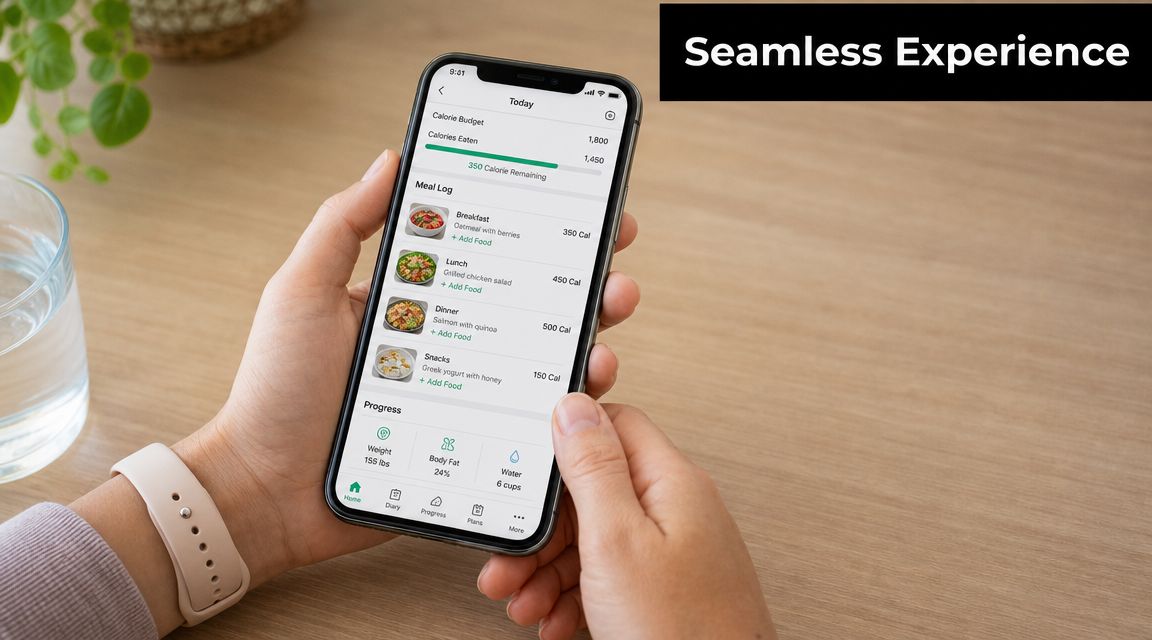
Most users don't abandon diet apps because they hate nutrition. They abandon them because the app asks for too much effort at the wrong time.
A busy person opens the app at lunch, with one hand free, low attention, and no patience for a twelve-step logging flow. The same person opens it on Sunday night to plan the week, trying to balance time, ingredients, preferences, and whatever is already in the fridge. Those are two different UX moments, and the app needs to respect both.
Reduce logging friction first
The easiest place to lose users is meal entry.
A clunky app forces search, portion estimation, category selection, and confirmation before saving anything. A better app assumes repeated behavior. It offers quick add, recent meals, favorites, and one-tap reuse from prior days. If users plan ahead, logging should often be a confirmation step, not fresh data entry.
That's especially important if you want planning and tracking to reinforce each other. A weekly plan that becomes a daily checklist feels lighter than a tracker that keeps asking the same questions.
Useful UX patterns here include:
- Recent meal shortcuts for repetitive habits
- Saved combinations such as breakfast defaults or go-to lunches
- Calendar-linked checkoffs instead of separate logging flows
- Offline-safe entry with background sync when connectivity returns
Make planning feel lighter than memory work
Meal planning works when the interface reduces decision load.
The best pattern for many products is a calendar or timeline view that supports fast assignment of meals to days and meal types. Drag-and-drop interactions help, but only if the mechanics stay obvious. If users need a tutorial to place dinner on Thursday, the design is doing too much.
Recipe organization is another aspect of product usability. If the content layer is messy, planning feels messy. Tools such as OrganizEat's meal plan generator for easy weekly menus show how recipe storage, calendar planning, and grocery list creation can work together as one workflow rather than separate screens.
A meal planner should feel like reducing decisions, not creating another admin task.
A short product walkthrough can help teams study the pacing and interaction density that works well in nutrition apps:
Design for interrupted use
People use these apps between other tasks. In the kitchen. In a store aisle. In a car before pickup. At work between meetings.
That means your experience should support:
- Fast resume after interruption
- Clear sync status across devices
- Readable ingredient and meal views
- Buttons sized for real thumbs, not design mocks
- Predictable navigation, especially between planning, recipes, and shopping lists
When the app feels calm under pressure, retention gets easier. Not because the branding is stronger, but because the user can finish what they opened the app to do.
Your Phased Development Roadmap
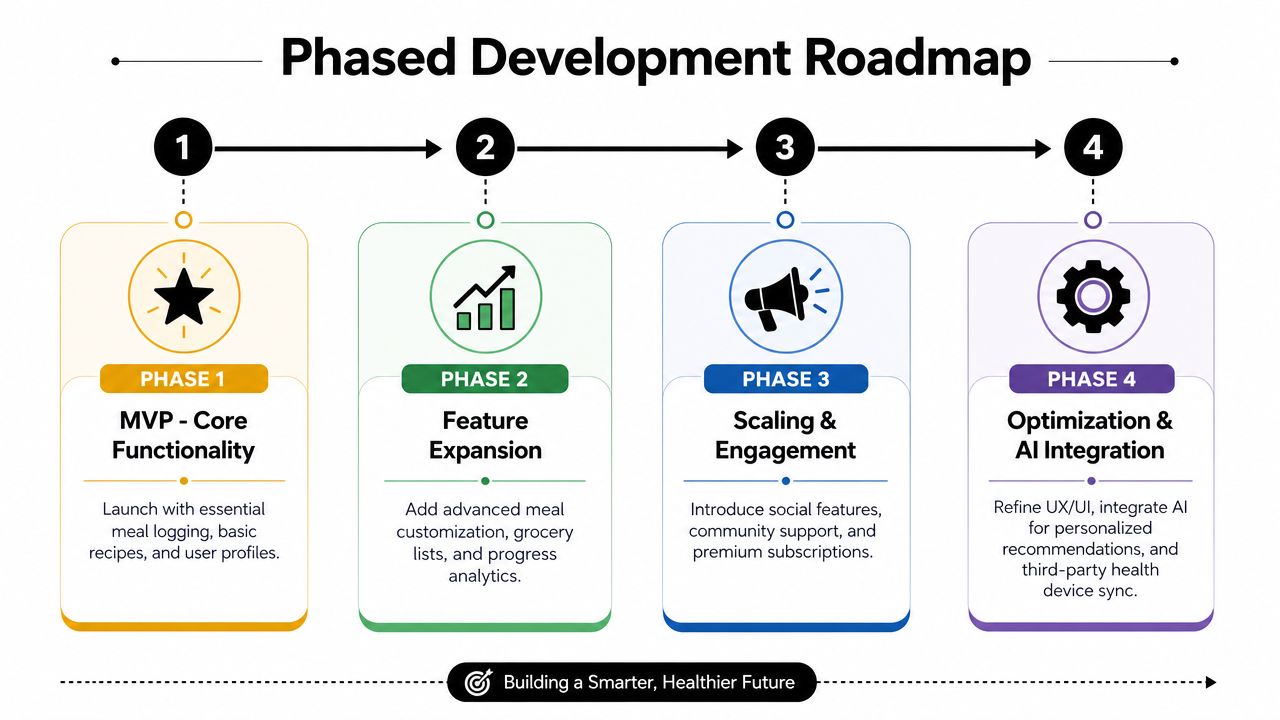
Founders get into trouble when they treat the roadmap like a wishlist. Diet planner app development works better when each phase earns the next one.
The practical model is simple. First, launch a product that can serve users without heavy AI. Then use real usage patterns to decide where intelligence helps. After that, harden the system for scale, compliance, and long-term trust.
Phase one should be useful without AI
Development guidance from Appinventiv's AI diet planner app development article suggests a rules-based MVP can be shipped in 8 to 12 weeks. That's a realistic pattern when the product uses a small set of structured inputs, such as calorie goal, food preferences, activity level, or household needs, to generate recommendations.
That first version should focus on:
- Onboarding with only essential inputs
- Meal planning logic driven by rules
- Recipe or meal management
- Shopping list creation
- Basic analytics or adherence tracking
- Operational admin tools, so your team can manage content and users
This phase matters because it gives you behavioral data. You'll learn what users save, skip, repeat, edit, and ignore. That's far more valuable than speculative AI brainstorming.
Phase two is where intelligence earns its keep
Once the MVP has real usage, you can add intelligence in places that remove repeated friction.
That can include:
- NLP chat for meal or plan assistance
- Computer vision for food logging
- Prediction logic for recommendations or substitutions
- More dynamic grocery generation
- Explainability UI, so users understand why a recommendation appears
The same development guidance recommends a quarterly retraining cadence with drift monitoring and output testing against fresh samples. That's the kind of operational detail founders often miss. AI features aren't just built once. Someone has to monitor them, test outputs, and keep them aligned with current user behavior.
A lot of teams also underestimate mobile security when they rely on managed back ends during this phase. If you're using Firebase or Supabase, this overview of mobile app security for Supabase and Firebase is a useful technical reference for tightening access patterns and avoiding common mistakes before growth exposes them.
Build AI after you know which decisions users want help with. Otherwise you're automating guesses.
Phase three is scale, governance, and trust
The final phase isn't flashy, but it's where the product becomes dependable.
At this stage, teams usually need to formalize:
Compliance and data governance
Health-related data handling, retention rules, consent flows, and internal access controls.Testing discipline
Not just functional testing, but output checks for recommendation systems, device-level QA, and integration stability.Infrastructure hardening
Better observability, queue handling, failure recovery, and support tooling.Experimentation systems
A/B testing for recommendation quality, onboarding changes, and monetization flows.
The common failure mode is trying to jump from phase one to phase three without the learning in between. That usually leaves the team with expensive architecture, weak usage, and no proof that the complex parts matter.
Budgeting Monetization and Launch Strategy
A lot of diet apps fail after launch for a simple reason. The business model assumes a richer product than the team can afford to build in version one.
That mismatch shows up fast. A founder budgets for a lean meal planner, then prices it like a coaching platform with adaptive recommendations, premium content, and family coordination. Users hit the paywall before they feel enough value to pay.
The safer sequence is narrower. Start with an MVP that solves one recurring planning job well, prove retention, then expand pricing and scope together. That matters even more if your niche is under-served groups such as families, where shared planning and grocery coordination can become a strong paid feature later, but only after the core workflow gets regular use.
Tie monetization to user behavior
Three models usually fit this category, but they do not fit at the same stage.
Freemium
Best for products where habit formation comes first. Free access should cover the planning loop itself, such as meal scheduling, recipe saving, and basic shopping lists. Paid tiers can add automation, deeper nutrition analysis, household coordination, or premium content.Subscription
Best when the app keeps reducing effort every week. Personalized plans, rotating meal suggestions, grocery logic, family accounts, and coach-led features support recurring billing better than static utilities do.One-time purchase
Better for simple tools with limited ongoing costs. It is a weak fit for products that depend on fresh content, integrations, support, and continuous iteration.
For a first release, I usually advise founders to avoid stacking multiple revenue models at once. Pick one primary model and test whether users complete the core loop often enough to justify it. If they do not return every week, subscription revenue will be hard to defend.
Founders looking for ways to reduce delivery cost during MVP development may find Appjet.ai's guide to agentic development useful for evaluating how automation changes team structure, throughput, and cost control.
Budget for the app you can launch
Cost depends less on the category name and more on what the product must do on day one.
A focused single-platform planner with recipe management, a meal calendar, basic onboarding, and lightweight admin support is a very different project from a cross-platform app with wearable sync, advanced nutrition logic, AI recommendations, family accounts, and compliance-heavy data handling. Founders often underestimate the second group of costs. QA across devices, release prep, analytics setup, content operations, support tooling, and post-launch fixes can consume as much attention as feature development.
This budgeting frame is more useful than chasing a single number:
| Budget band | What it usually supports | What to avoid |
|---|---|---|
| Lower MVP budget | Single-platform build, focused planning flow, simple back end, basic content management, limited integrations | Cross-platform release, custom AI, broad personalization, too many edge-case workflows |
| Mid-range product budget | Better UX polish, stronger API design, more testing coverage, selected integrations, subscription infrastructure | Expanding into coaching, commerce, and family complexity all at once |
| Higher custom build budget | Proprietary recommendation logic, deeper data models, broader platform support, larger compliance and QA effort | Assuming premium pricing before retention and conversion are proven |
A practical rule is to fund the next learning milestone, not the full vision. For an MVP, that milestone is usually one of three things: users complete weekly meal plans, households return often enough to form a habit, or a paid upgrade converts without heavy discounting.
Launch with a checklist and a measured rollout
Launch plans should protect learning, not just create noise.
Start with a beta group that matches your niche. If the product is built for families, test with real households managing shared meals, changing schedules, and grocery coordination. Solo users will not expose the same problems. If the niche is people managing dietary restrictions, test substitutions, ingredient warnings, and trust in recommendations before you spend on acquisition.
Track a short list of signals during beta:
- Onboarding completion
- First meal plan created
- Shopping list accuracy
- Weekly return rate
- Paywall conversion friction
- Crash and sync issues
- Support requests by theme
Then tighten store compliance, privacy disclosures, subscription handling, and analytics before the public release.
A staged rollout works better than a broad launch. Release to a smaller user cohort, fix the obvious breakpoints, review support tickets weekly, and expand once retention looks stable. That sequence keeps spending in line with evidence.
If you're building a product around recipes, meal calendars, grocery workflows, or family planning, OrganizEat is worth reviewing as a reference point for how recipe organization, cross-device sync, shopping lists, and calendar-based planning can fit together in one user flow.