


You saved a pasta recipe from Instagram, bookmarked a weeknight soup from a blog, screenshotted a brownie recipe from TikTok, and still keep your grandmother's pie card tucked into a cookbook. Then Tuesday hits, the fridge is half full, and the one recipe you want has vanished into a maze of tabs, camera roll clutter, and forgotten saves.
This is the core reason people start searching for recipe box app reviews. It's rarely about collecting more recipes. It's about getting your cooking life under control so inspiration turns into dinner, groceries, and repeatable meals instead of digital mess.
The strongest recipe apps solve one simple problem: they give scattered recipes a single home. That basic value has stayed consistent for years. Historical discussion around recipe apps shows that people have long cared about URL importing, recipe parsing, offline access, grocery lists, and meal planning because they want clean, searchable storage that works in a real kitchen, not just a prettier notes app (long-running discussion of recipe app value).
Table of Contents
- The Modern Recipe Chaos and Its Solution
- Core Features Every Great Recipe App Needs
- A Feature-by-Feature Comparison of Leading Apps
- The Real Test of Photo and Screenshot Capture
- Which Recipe App Is Right for Your Cooking Style
- Migrating Your Recipes to a New Digital Home
- Frequently Asked Questions About Recipe Apps
The Modern Recipe Chaos and Its Solution
Most home cooks don't have a recipe problem. They have a recipe retrieval problem.
One dinner idea lives in browser bookmarks. Another is trapped in an Instagram saved folder. A third is sitting as an unlabeled screenshot beside vacation photos and school forms. Add a few handwritten cards and a stained cookbook page, and cooking starts feeling like file management.
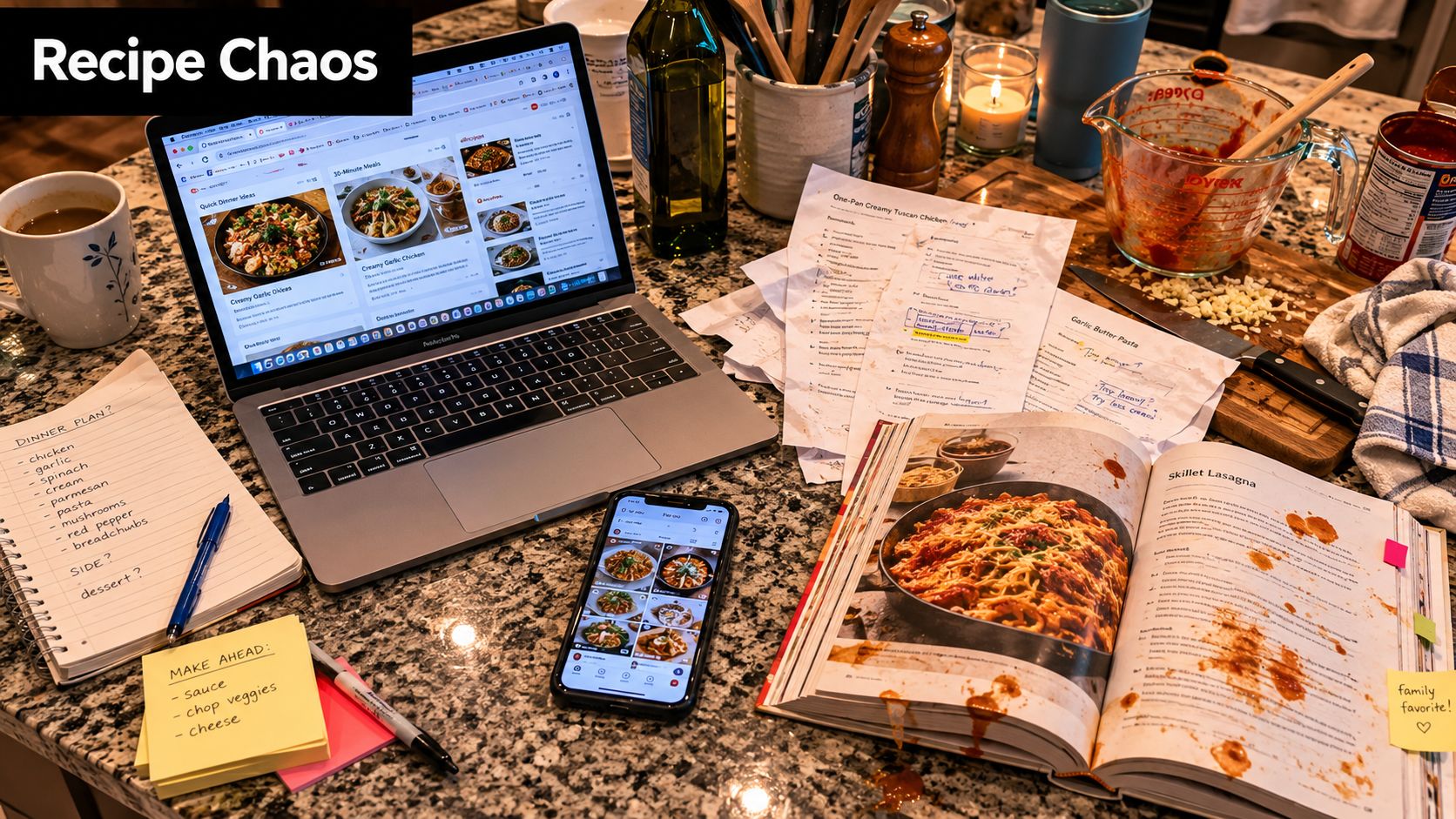
What the mess looks like in real life
A normal week makes the problem obvious. You save a video for spicy salmon bowls on Sunday. By Wednesday, you remember the sauce but not the creator. Friday comes around and you want that roasted vegetable pasta from a blog, except the site is buried in open tabs on a different device. On Saturday, you decide to bake from an old family card and end up typing the whole thing into your phone by hand.
That friction changes what people cook. They stop making the recipes they wanted and default to the few they can find.
A good recipe app isn't just storage. It shortens the distance between “I saved this” and “I'm cooking this tonight.”
What a digital recipe box actually fixes
The useful solution is a single searchable library that accepts recipes in messy forms, then turns them into something you can act on. Not just save. Use.
The better apps connect several steps at once:
- Capture: import from websites, social posts, screenshots, or photos.
- Organize: tag recipes, sort them into categories, and make them searchable.
- Plan: drop recipes into a meal calendar or shortlist.
- Shop: turn ingredients into a grocery list without retyping.
- Cook: open a clean recipe view that works at the counter.
That's why this category has lasted. People have consistently valued the same core functions because the kitchen problem hasn't changed. The sources may have changed. The need for order hasn't.
Core Features Every Great Recipe App Needs
Before comparing app styles, it helps to know which features matter and which ones look good in screenshots but don't hold up during a busy week.
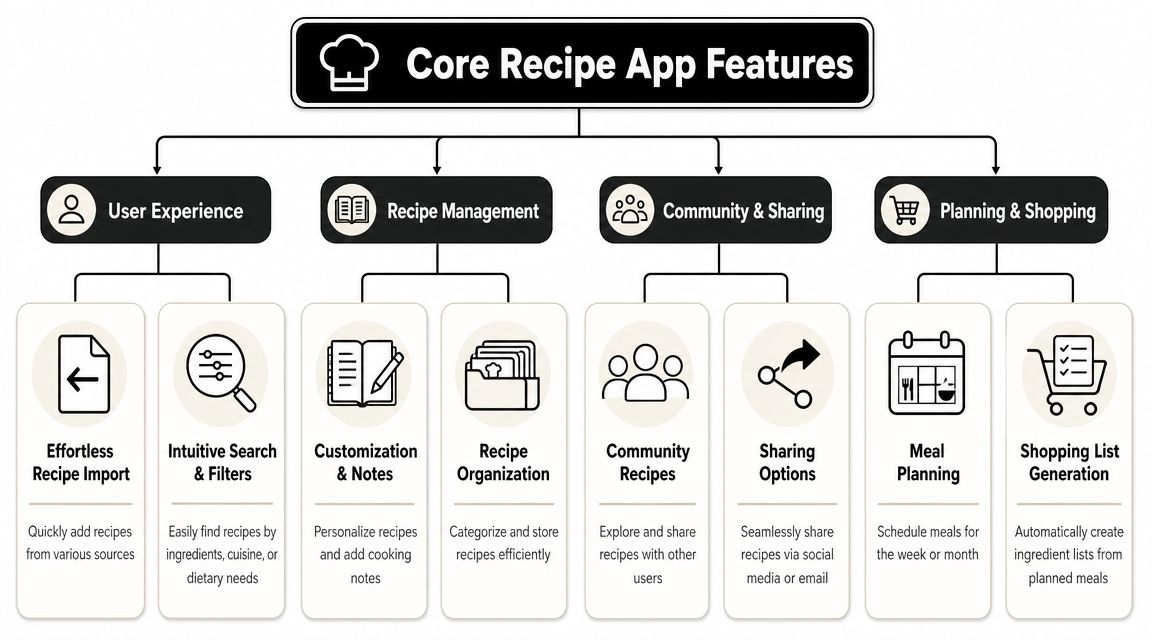
| What to evaluate | Why it matters in a real kitchen | What weak apps do |
|---|---|---|
| Recipe capture | Saves time at the moment you find a recipe | Force manual copy-paste |
| Search and organization | Helps you find recipes by ingredient, meal, or tag | Leave everything in one flat list |
| Meal planning | Turns a collection into an actual dinner plan | Treat planning as an afterthought |
| Grocery list creation | Cuts duplicate work before shopping | Export messy ingredient text |
| Offline access | Keeps recipes available in stores or low-signal kitchens | Depend fully on a connection |
| Cross-device sync | Lets you save on one device and cook on another | Trap your library on one phone |
Capture has to be frictionless
The first test is simple. Can you save a recipe while you're busy, distracted, and holding a phone in one hand?
Independent app-store coverage treats capture breadth as a key differentiator. Some apps claim import from “any website or app,” while others also support offline use, grocery lists, meal planning, and cloud sync through services such as Dropbox, Google Drive, pCloud, and WebDAV (app listing describing import breadth and sync options). That matters because recipe sources are messy now. Good apps meet you where the recipe lives.
Storage alone isn't enough
A library gets valuable only when you can search it fast. Search by title is the bare minimum. Better systems let you filter by category, ingredient, meal type, or your own tags. If you cook around what's in the fridge, this matters more than polished design.
Meal planning and shopping also need to connect cleanly. If adding three recipes to a week plan still requires manually rebuilding the shopping list, the app is only solving half the problem.
For a deeper checklist, this guide to features to look for in recipe apps is worth skimming before you pick one.
Practical rule: If an app saves recipes well but makes planning and shopping clumsy, you'll use it as an archive, not as a cooking tool.
Reviews can tell you whether the basics hold up
App-store ratings aren't perfect, but they do show whether a product has earned trust over time. On Apple's App Store, RecipeBox – Save Your Recipes! shows 14K ratings and an average of 4.7/5, a visible trust signal that can strongly affect how shoppers judge recipe organizer apps before downloading (Apple App Store listing for RecipeBox).
What I look for in reviews is less about praise for the interface and more about recurring kitchen language. People mention wanting recipes “in one place,” along with grocery lists and meal planning. That's a clue the app supports an actual household workflow, not just collection for collection's sake.
A Feature-by-Feature Comparison of Leading Apps
The useful way to read recipe box app reviews is by workflow, not by app-store description. Most apps can claim “save recipes.” Fewer can handle the full chain from chaotic capture to shopping and cooking without creating more work.
Recent comparison coverage treats higher-end recipe organizer apps as workflow tools, not simple storage. The stronger options are judged on how they combine social-import capture, photo scanning, advanced search, meal planning, and smart shopping lists into one system (2026 comparison coverage of recipe manager workflows).
Recipe App Feature Comparison
| Feature | Basic Organizer | Advanced Planner | All-in-One System |
|---|---|---|---|
| Recipe capture | Usually handles websites and manual entry | Good website capture, sometimes better structure | Handles web, social sources, screenshots, and photo input more smoothly |
| Organization | Folders or basic tags | Better categorization and search | Strong search, tagging, filtering, and usable structure across a large library |
| Meal planning | Limited or absent | Built around calendar planning | Planning is connected to saved recipes and shopping |
| Grocery lists | Simple ingredient lists | Better list building from planned meals | Consolidated shopping tied directly to recipe selection |
| Cooking mode | Plain recipe view | Often cleaner for active cooking | Designed for hands-busy kitchen use |
| Best for | Casual savers | Families planning ahead | Home cooks who want one connected system |
Recipe capture separates casual apps from serious ones
Basic organizers often work fine if you mostly save from websites and don't mind occasional cleanup. They break down when your recipe sources are mixed. Social videos, screenshots, and clipped photos expose every weakness in import logic.
Advanced planners usually handle structure better. They're more useful once recipes are already in the system. The trade-off is that some of them still assume a cleaner input than most cooks have.
All-in-one systems do better when your input is chaotic. They're built for mixed sources and try to normalize them into a usable recipe card. That doesn't mean every import is perfect. It means you spend less time rebuilding the recipe yourself.
The real question isn't “Can this app import recipes?” It's “How much cleanup will I still do after import?”
Meal planning should reduce decisions
A lot of apps add a calendar and call it meal planning. That's not enough.
Good planning features let you choose saved recipes quickly, place them on specific days, and then build a grocery list from the plan. Better ones also make it easy to repeat family staples. You don't want to reassemble taco night from scratch every single week.
Basic organizers tend to leave planning outside the app. You save recipes there, but plan elsewhere. Advanced planners usually make the calendar central. All-in-one systems work best when planning, grocery generation, and cooking all pull from the same recipe library.
Grocery lists reveal whether the workflow is connected
Shopping lists are where weak apps often show their seams. A feature can exist and still be annoying.
What works:
- Ingredient-based export: the app pulls ingredients directly from saved recipes.
- Editable lists: you can remove pantry staples or add household items.
- Consolidation: duplicate ingredients combine into a cleaner list.
- Context for shopping: the list reflects your actual meal plan, not random saved recipes.
What doesn't work is a shopping list that feels like a text dump. If you still need to rewrite it aisle by aisle or manually clean every line item, the app didn't save much time.
Search matters more as your library grows
When you're starting out, almost any app feels organized. After enough recipes, weak search turns the whole thing into another junk drawer.
Basic apps usually rely on title browsing and folders. That works for a while. Advanced planners improve things with tags and categories. All-in-one systems tend to do better if you cook by ingredient, dietary need, season, or source.
One practical example: if you often think, “What can I make with chickpeas and spinach tonight?” then folder-only organization won't carry you very far.
Cooking mode is the forgotten feature
A recipe app can be excellent at importing and still be irritating on the counter. Dense layouts, tiny text, and sleep-prone screens become a problem once oil is sputtering and your hands aren't clean.
The best cooking view is simple. Big text. Clear steps. Screen stays awake. Easy scaling if you're doubling a recipe. Minimal clutter.
OrganizEat is one example of the all-in-one approach. It combines capture from social platforms and websites, photo-based recipe saving, grocery-list building, meal planning, cross-device sync, offline access, and a dedicated cooking mode in one library. That style suits cooks who want a single place to manage the whole process rather than separate apps for saving, planning, and shopping.
The Real Test of Photo and Screenshot Capture
Photo import is one of the most overpromised features in recipe apps.
It sounds simple. Snap a cookbook page, import a handwritten card, or save a screenshot from social media. In practice, polished demos often collide with real kitchens, bad lighting, cursive handwriting, glossy paper, and camera rolls full of mixed images.
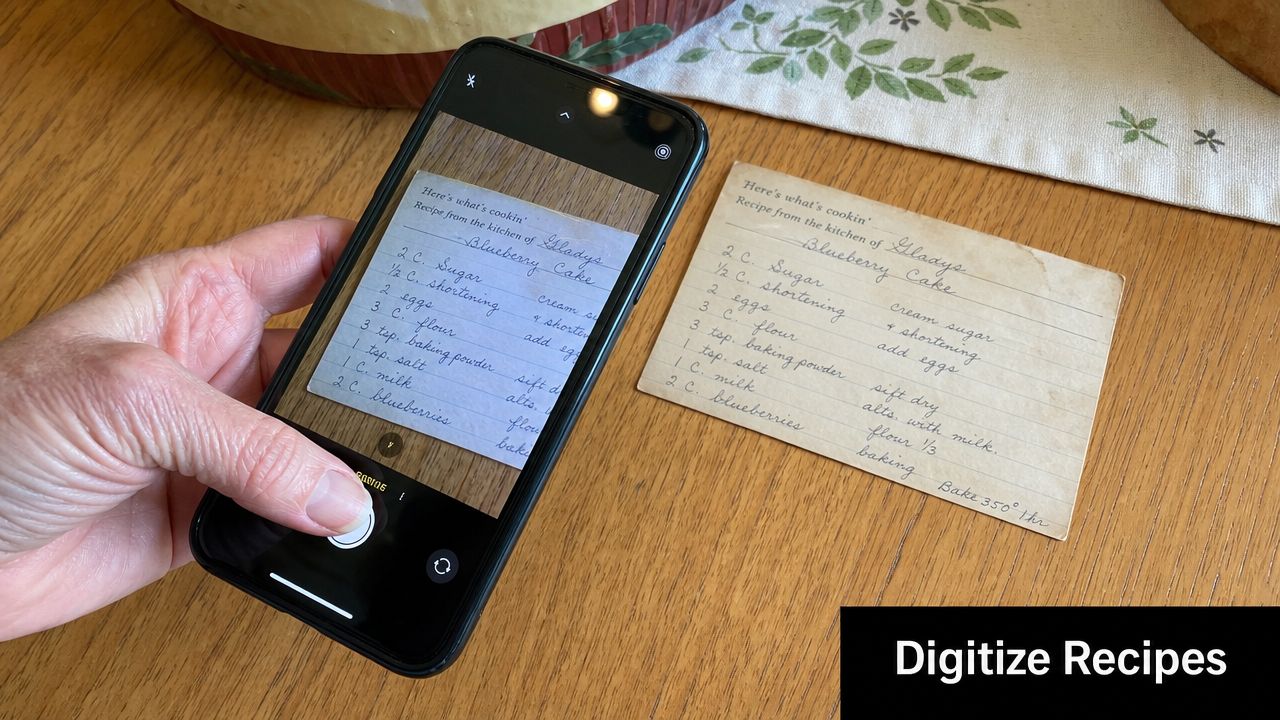
What usually goes wrong
The hardest scans aren't pristine typed pages. They're family cards with slanted handwriting, magazine clippings with faded text, and cookbook pages that curve toward the spine. OCR can misread ingredient amounts, merge lines, or skip headings completely.
One detailed walkthrough of recipe photo import specifically warns users to preview scanned results, especially for handwritten recipes. That's a practical clue that real-world accuracy isn't guaranteed and that better reviews should compare failure modes, not just claim the feature exists (walkthrough discussing photo import preview for handwritten recipes).
What to look for instead of marketing claims
A useful scanner doesn't have to be flawless. It has to be recoverable.
Look for these traits:
- Easy recropping: you can quickly fix a bad page edge or shadow.
- Editable text fields: ingredients and instructions can be corrected without friction.
- Searchable results: once cleaned, the recipe stays useful in your library.
- Good screenshot handling: the app can pull usable structure from social screenshots, not just full-page cookbook photos.
If your phone stores images in HEIC and you ever need to convert them before sharing or importing elsewhere, this Smooth Capture HEIC converter guide is a practical reference. It's especially helpful when a recipe image looks fine on your phone but behaves oddly in another tool.
Handwritten recipes are the stress test. If an app handles those with only minor cleanup, its photo import is probably usable.
Screenshots need a different kind of intelligence
Screenshots aren't the same as scans. They often contain usernames, captions, comments, or cropped ingredient text. Some apps treat the whole image as a blob. Better ones help you isolate the recipe itself or pull text that can be cleaned into a card.
If photo capture is high on your list, this roundup of recipe apps with built-in OCR can help narrow the field.
A quick demo helps show what this category is trying to solve:
The practical takeaway is simple. Don't judge photo import by whether the button exists. Judge it by how much editing it leaves behind.
Which Recipe App Is Right for Your Cooking Style
Dinner starts the same way in a lot of homes. A saved reel is buried somewhere in your phone, the ingredient list is in a screenshot, and the actual cooking happens from memory while you check the fridge and hope you bought enough garlic. The right recipe app fixes that whole chain, not just the storage part.
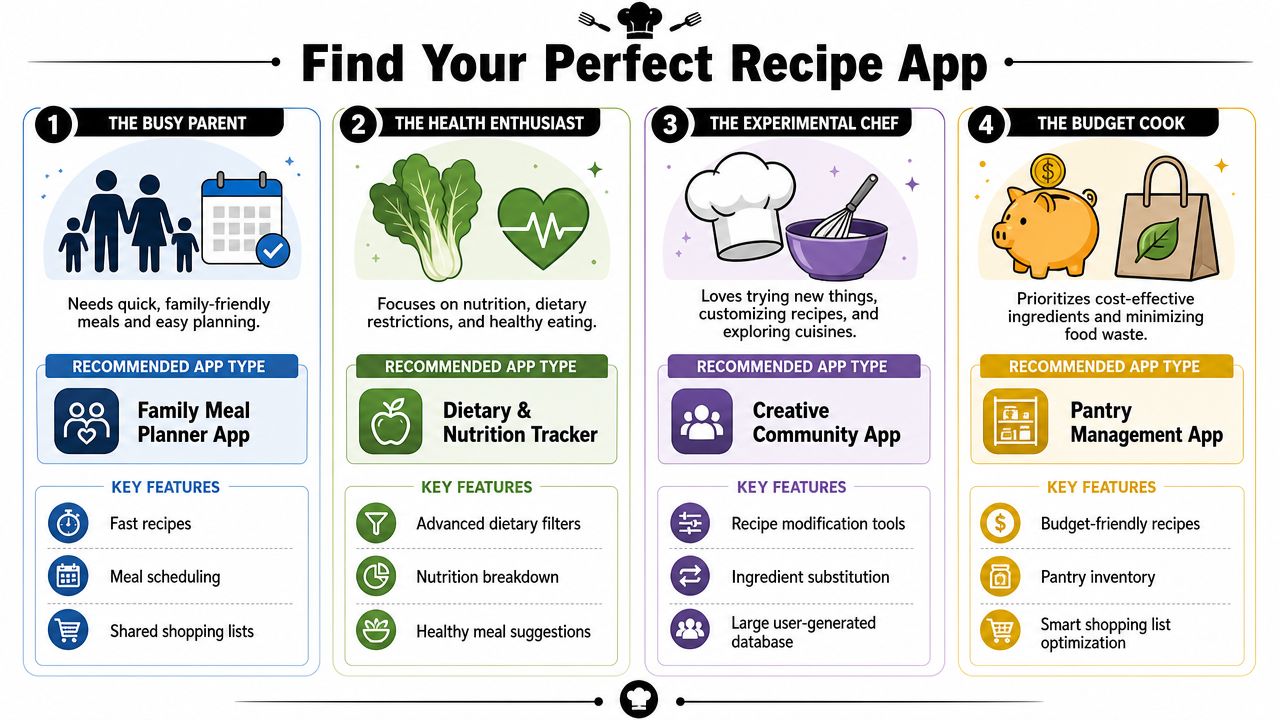
A good fit depends on where your recipe system breaks first. For some cooks, the mess starts at capture. For others, it starts when saved recipes never turn into a shopping list or a usable weeknight plan.
The social media saver
This cook collects recipes faster than they cook them. The core question is whether the app can turn scattered finds into something usable later.
Choose an app type that handles the full path well:
- Quick saving from social posts, screenshots, and browser links
- Easy cleanup after import
- Tags and search that still work when the library gets large
- Sync across phone, tablet, and desktop
If your recipes come from mixed sources, the best app is usually the one that makes capture and retrieval feel easy on a Tuesday night. For help turning web finds into a library you will cook from, this guide to building a personal digital recipe collection from web recipes is a practical place to start.
The family meal planner
This cook has a shorter path from saved recipe to dinner. They need recipes to connect cleanly to the week ahead, then to one shopping trip that covers it.
The best fit is usually an app with:
- Meal planning on a calendar
- A grocery list that combines overlapping ingredients
- Shared access for a partner or family
- Reliable kitchen and store use, even with spotty service
Pretty recipe cards do not help much if planning still happens in one app and shopping in another. The useful test is simple. Can you pick four meals, add them to the week, and get a grocery list you would trust at the store?
The recipe archivist
This cook is not just saving dinner ideas. They are preserving the notes in the margins, the substitutions, the stained index cards, and the recipes nobody wants to lose.
They need:
- Photo import for old cards, clippings, and notebook pages
- Editing that allows personal notes and odd formatting
- Folders or categories that mirror a family collection
- Backup and sync that protect the archive
I have found that archivists get frustrated by apps built mainly for clean web imports. Family recipes are rarely tidy. The app needs to accept that and still leave the collection searchable and usable.
The flexible weeknight cook
This cook starts with what is already in the house. Search matters more than collecting. Filters matter more than social saving. A readable cooking view matters more than polished design.
The strongest fit is often an all-in-one app that connects saved recipes, ingredient search, shopping lists, and cooking mode in one place. If you cook this way, speed wins. You want to go from "I have chicken thighs, spinach, and half a lemon" to a workable dinner in under a minute.
A practical way to choose
Pick the app that solves your most common failure point in the recipe cycle.
If recipes disappear into screenshots, choose better capture and organization. If your problem starts on Sunday, choose planning and list-building. If your valuable recipes still live on paper, choose flexible digitization and backup first.
The same logic shows up in other kinds of moves too. Teams planning a site move focus on avoiding downtime during migration because the handoff matters as much as the destination. Recipe apps work the same way. The right one does more than hold recipes. It gets them from idea to cart to counter without extra friction.
Migrating Your Recipes to a New Digital Home
Switching apps feels bigger than it is. The easiest way is to treat it like a pantry reset. Don't move everything at once. Move what you use, then build from there.
Start with your active recipes
Begin with the meals you cook often. Your weeknight pasta, two or three lunch staples, a few breakfasts, and the family favorites you'd hate to lose. That creates momentum fast and gives the new app immediate value.
Then gather recipes by source:
- Browser bookmarks for blog recipes you still make.
- Saved social posts worth keeping.
- Screenshots that contain complete or mostly complete recipes.
- Paper recipes you want preserved first.
Use a simple import order
Move recipes in this order: web links first, screenshots second, paper last. Web recipes are usually the cleanest imports. Screenshots need some review. Handwritten cards and cookbook pages take the most attention, so save them for when your system is already working.
If you're converting web content into a personal library, this guide to building personal digital recipe collections from web recipes gives a practical workflow.
Keep the old system available during the switch
Don't delete your old app, notes folder, or bookmark archive on day one. Keep it accessible until the recipes you use regularly are safely in the new system and properly organized.
That's the same logic people use when thinking about avoiding downtime during migration in larger digital moves. The kitchen version is simpler, but the principle holds. Don't break dinner while you're trying to improve dinner.
A few tags at the start go a long way. Add meal type, family favorites, and a couple of ingredient tags. You can refine later. What matters most is getting recipes into one place you'll use.
Frequently Asked Questions About Recipe Apps
Are paid recipe apps worth it?
They can be, if you cook from a mix of sources and want planning plus shopping in one place. Free apps are often enough for basic storage. Paid options tend to make more sense when you need sync, offline access, better capture, or family collaboration.
Can a family share one recipe app?
Many apps support shared use in some form, but the quality of that experience varies. What matters is whether shopping lists, meal plans, and recipe edits stay clear instead of becoming confusing. For families, shared grocery and meal-planning features usually matter more than social sharing.
What happens if I switch apps later?
That depends on how portable your recipe library is. Before committing, check whether you can export recipes, preserve notes, and keep your structure intact. If an app makes it easy to get recipes in but unclear how to get them out, that's worth noticing early.
If you want one place to collect recipes from social media, websites, screenshots, and handwritten cards, OrganizEat is built for that full kitchen workflow. It lets you save, organize, plan meals, build shopping lists, and cook from the same library across devices, which is what most home cooks are trying to fix when they start reading recipe box app reviews.